Learn with April

Vibe session · Microsoft 365 Copilot

I Didn't Know Copilot Could Do That

A reusable countdown of Microsoft 365 Copilot features people already have but often miss. Follow the demo flow, download each reference file, and copy the prompts directly from this page. Every demo happens inside April's Analog, a fictional record shop preparing for a three-night music festival.

Presented at Vibe 2.0 September 21–23, 2026 · Salt Lake City Area, Utah I Didn't Know Copilot Could Do That session cover

Want everything at once? The compact demo pack contains only the reference files used by the runbook below: Excel and Word samples, skill packages, synthetic Outlook messages, the brand-kit guide, and stage props. You can also download only the files needed for each demo. The sanitized demo recordings are available in the Vibe recordings release.

Skills are the through-line

Three skills you can reuse immediately

Download the working skill packages for PowerPoint, Excel, and Agent Builder. Each uses the open SKILL.md format.

New to the format? Read the S.K.I.L.L. framework guide.

Safe demo setup: all included names and messages are synthetic, and every email address uses the reserved .example domain. Import the EML files into a disposable demo tenant; do not substitute real customer mail or record colleagues without informed consent.

The demo runbook

Run the demos in countdown order. Each section tells you what to prepare, what to open, and exactly what to paste. Number 5 has intentionally been removed from this version.

10

Never build a PivotTable again

Excel turns a natural-language request into a PivotTable, chart, and slow-stock analysis.

Reference file

Demo flow

  1. Download Inventory.xlsx, upload it to OneDrive, and open it in Excel.
  2. Open Copilot and paste the first prompt.
  3. After the PivotTable and chart appear, paste the follow-up prompt.
  4. Point out the records older than 90 days and how quickly the view can be refined.
Show stock value by genre and format as a PivotTable with a chart, and flag anything in stock over 90 days.
Show it as % of total.

Expected result: the workbook contains 2,000 inventory records, with roughly two-thirds of the stock older than 90 days.

9

Let Word and PowerPoint do the work

Apply review comments in Word, then create a sponsor deck from a folder of source material.

Reference files

Demo flow

  1. Upload the three festival files to an Analog Fest SharePoint folder.
  2. Open Fest_Plan.docx in Word, select Copilot > Catch up, and review what changed.
  3. Paste the Word prompt and let Copilot apply the three reviewer comments.
  4. Open PowerPoint on the web, create a new presentation, and paste the deck prompt.
  5. Select the April's Analog brand kit when PowerPoint asks for a template.
Apply the edits requested in the comments.
Create a 6-slide Analog Fest sponsor pitch from the Analog Fest folder.
8

Teach PowerPoint and Excel a skill

Use reusable instructions instead of explaining the same output every time.

Reference files

Demo flow

  1. Extract each skill into its own matching folder in your OneDrive Skills location.
  2. In a new PowerPoint deck, attach Last_Fest_Notes.docx and invoke the recap skill.
  3. Return to the inventory workbook from demo 10 and invoke the built-in brand-kit skill.
  4. Open Weekend_Sales.xlsx and invoke the weekly-sales-review skill.
@analog-event-recap using Last_Fest_Notes.docx
@brandkit
@weekly-sales-review
7

Show Copilot your screen with Vision

Ask questions about a physical object or a visual already on your screen.

Reference files

Demo flow

  1. Print or display the LP back cover and open a voice chat in the Copilot mobile app.
  2. Turn on the camera, point it at the cover, and ask the first question.
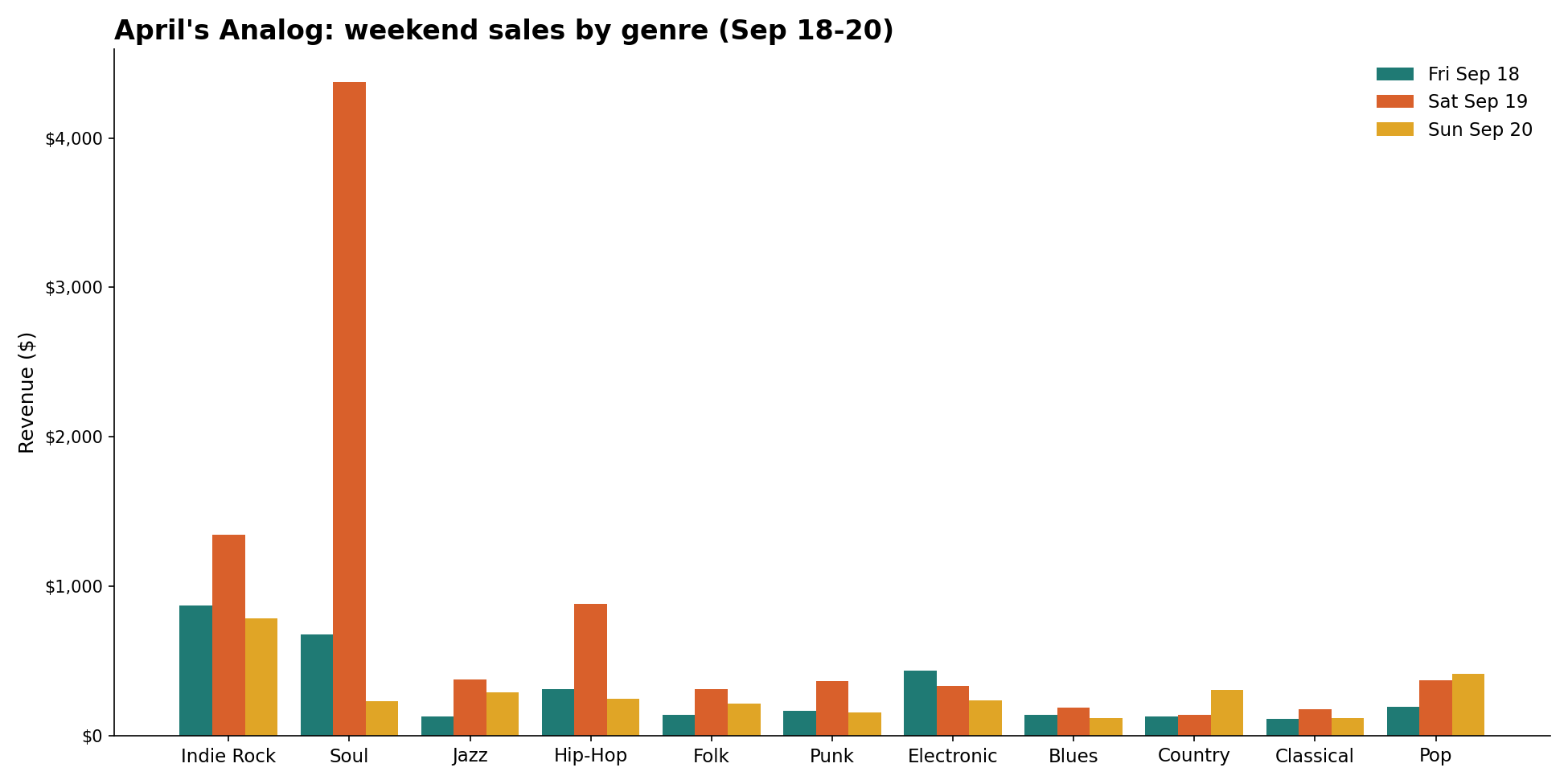
  3. On desktop, share the genre chart with Vision and ask the comparison question.
What pressing is this, and do we already have it in our inventory?
What stands out here compared to our Analog Fest plan?
6

Use the power of Notebooks

Ground a short project in files, email, and a meeting, then turn the answer into a shared Page.

Reference files

Demo flow

  1. Create a Copilot Notebook named Analog Fest.
  2. Import the synthetic EML files into a disposable demo mailbox.
  3. Add the festival plan, last recap, Sound + permits email thread, and transcribed planning meeting.
  4. Generate an audio overview before the session if you want to show it.
  5. Paste the run-of-show prompt, convert the answer to a Page, then add the staffing table.
Draft a run of show for Analog Fest Friday: doors, sets, changeovers, record swap, close.
Add a table of staff shifts with a column for who's on the bar.
4

Make it remember, and make it forget

Contrast temporary chat with a saved memory that changes a later response.

Reference file

Demo flow

  1. Import the synthetic EML files into a disposable demo mailbox.
  2. Start in temporary chat and ask Copilot to draft the confirmation email.
  3. Return to a normal chat, save the band-deal memory, and ask for the email again.
  4. Compare the results, then show where saved memories can be viewed or deleted.
Draft an email to The Velvet Static confirming their Friday Analog Fest set. Remind them of our stage setup, load in and rate.
Remember that we pay local bands a flat $200 plus 20% of the door, load-in is always 5pm, and our stage has no house drum kit.
3

Make Copilot sound like you

Combine global writing instructions with examples of your real voice.

Reference files

Demo flow

  1. Upload the writing samples to a OneDrive folder named MyVoice.
  2. Add the custom instructions below under Settings > Personalization.
  3. Open the Crate & Needle pop-up request in Outlook and use Draft with Copilot.
Be direct. Lead with the benefit.
Use contractions: can't, don't, it's.
Never use em dashes.
Explain new ideas with an analogy.
Keep emails under 120 words.
End with one clear next step.
Say yes to a pop-up table, in the style of the emails in my MyVoice folder.
2

Let two AI models check each other's work

Run the same business question through Researcher Critique and Model Council.

Demo flow

  1. Open Researcher and select Critique in the model picker.
  2. Paste the question and show how the second model reviews evidence, gaps, and sources.
  3. Run the same question with Model Council and compare where the models agree or disagree.
  4. Pre-run both tabs before a live presentation so the results are ready.
Should April's Analog launch a monthly vinyl subscription box? Market size, three competitors, pricing, and risks for a small independent shop. Cite sources.
1

Teach an agent a skill

Package a repeatable voice and workflow into a skill for Agent Builder.

Reference files

Demo flow

  1. Create an agent named Analog Voice with the description below.
  2. Under Configure > Skills, upload sound-like-april.zip.
  3. Open Preview and ask for the newsletter introduction.
  4. For the bonus, attach the tech rider and ask Agent Builder to create a stage-checklist skill.
Writes shop emails, newsletters, and social posts for April's Analog.
Write the intro for this month's newsletter announcing Analog Fest.
Create a skill that turns a band's tech rider into a stage checklist for our sound tech.

Bonus prompts

Save these to the Analog Staff team's Prompt Gallery for a quick audience takeaway.

Summarize this week's email from labels and flag anything that needs a reply today.
Turn these notes into a 5-slide recap using the April's Analog brand kit.
Draft a volunteer thank-you email in my voice. Under 120 words.