 Learn with April
Launch resource · Guide & slide deck
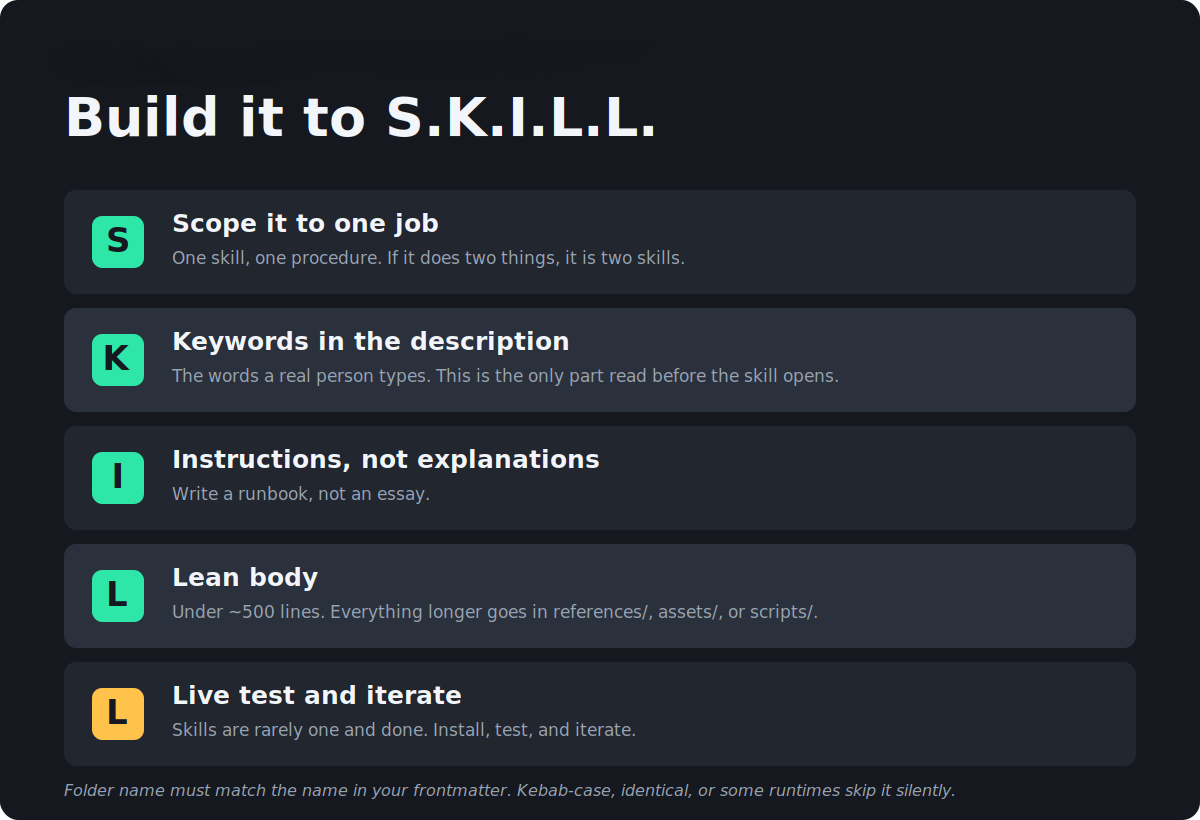
Build it to S.K.I.L.L.
Five rules for writing agent skills that actually fire, plus working examples for M365 Copilot, Copilot Studio, Cowork, and Power Platform.
- Reading time
- About 12 minutes
- Best for
- Skill authors and agent builders
- Prerequisites
- None
- Last reviewed
- September 21, 2026
Start with the description
If a skill doesn't seem to work, check whether it ran at all. The agent reads your
name and description before deciding whether to open the file,
so the instructions in the body won't help if the description never matches.
These five rules cover how to write and test both.
New to skills?
Start with the difference between a one-off prompt and a saved skill. You don't need to write one to understand when it might help with your work.
Using maker tools?
Use the framework to write instructions for the Copilot Studio, Cowork, and Power Platform experiences that support skills. Test the description with the kinds of requests your users will make.
Writing your own skills?
Skills are an open standard (see "Where skills run" below). The mental model of instructions, knowledge, tools, and skills generalizes past any one vendor's implementation.
A prompt is something you say. A skill is something you decide.
A prompt gives instructions in a conversation. A skill saves a procedure in a file, so you can version it, review changes, and share it with people who need the same process. The agent loads those saved instructions when a request matches.
The framework
-
Scope it to one job
One skill, one procedure. If it does two things, it is two skills. If you cannot describe what your skill does in one sentence without using "and," split it.
-
Keywords in the description
The description is the only part read before the skill opens. Load it with the words a real person would type, not the tidy internal name for the process. Third person, start with "Use when," one to three sentences, under about 500 characters.
-
Instructions, not explanations
Write a runbook, not an essay. The agent is not being persuaded, it is being told. Count the hedges in your draft. Every "generally," "usually," and "use your judgment" is a decision you pushed back onto the model.
-
Lean body
Keep it under about 500 lines, or roughly 5,000 tokens. The whole body loads when the skill activates. Anything longer goes in
references/(background it might look up),assets/(templates it builds from), orscripts/(the same answer every time). Those files are cheap to have but expensive to load, so bias toward the subfolders. -
Live test and iterate
Test the trigger before you test the output. Ask for the task five different ways and check whether the skill activates each time. If it doesn't, revise the description before changing the body.
The one that isn't a letter: the folder name must exactly match the
name in your frontmatter: kebab-case, lowercase, hyphens, max 64
characters. If they differ, some runtimes skip the skill silently. No error, no
warning, nothing in the logs.
What's actually in a skill
Only SKILL.md is required. Add the other folders when you need reference material, templates, or scripts.
client-qbr/
├── SKILL.md
├── references/
│   ├── account-health-definitions.md
│   └── qbr-writing-guide.md
├── assets/
│   ├── qbr-outline-template.md
│   └── risk-register-table.md
└── scripts/
    ├── calculate_burn.py
└── validate_qbr.py| Folder | The question | What goes there |
|---|---|---|
references/ | Is this background it might look up? | Policies, playbooks, style guides, thresholds |
assets/ | Is this something it builds the output FROM? | Templates, boilerplate, layouts |
scripts/ | Does this need the same answer every time? | Math, validation, parsing |
How much do you actually need?
Start at level 1. Climb only when the job forces you to.
| Level | Adds | When |
|---|---|---|
| 1 | SKILL.md only | You already know the process, you just don't want to retype it. |
| 2 | + references/ | The process needs knowledge attached: a policy, a playbook, a style guide. |
| 3 | + assets/ | The output has to look like something: a branded deck, a template. |
| 4 | + scripts/ | A step has to be right every time: math, thresholds, validation. |
A skill can stay at level 1 if the instructions are enough. Add reference material when the task needs it, and assign someone to keep it current. An outdated policy can lead the agent to give the wrong answer.
Where skills run
Skills are an open standard. The format came out of Anthropic and is published at
agentskills.io. The
core SKILL.md structure is portable across compatible products including
Microsoft 365 Copilot experiences, Copilot Studio, Copilot Cowork, GitHub Copilot,
VS Code, Claude, and Cursor. Installation paths, scope, supported metadata, scripts, and
asset handling can differ, so test each target product rather than assuming every folder
runs identically. One of the biggest differences is scope:
| Surface | Scope |
|---|---|
| Copilot Cowork, Copilot in Excel | Personal |
| Copilot in SharePoint | Site |
| Copilot Studio | Agent |
| Dataverse business skills | Organization |
| GitHub Copilot, VS Code | Repo or personal |
Product support, paths, packaging requirements, and limits change. Check the product-specific documentation before distributing a skill.
Building agents in Copilot Studio specifically? Agent Academy has free, hands-on labs for getting started there, including the new GitHub Copilot harness.
When not to use a skill
| If it… | It's actually a… |
|---|---|
| Needs to call a system | Tool. Skills are instructions, so they can't hit your API. |
| Is a one-off request | Prompt. The whole value of a skill is repetition. |
| Is reference material | Knowledge. A skill is a procedure, not a product catalog. |
| Defines who the agent is | Instructions. Tone and persona belong in the always-on box. |
Before you install someone else's
A skill is a dependency. Treat it like one:
- Review before use: read the
SKILL.md, the scripts, and the resources. Confirm the script does what it says. - Trust the source: skill instructions go straight into the agent's context. Watch for typosquatted names.
- Sandbox execution: anything with
scripts/should run isolated, with filesystem and network limits. - Log what loaded: which skills, which resources, which scripts. That's your audit trail.
Try it on one task
Pick a process you repeat, write it in a skill file, and test it with a few requests. Keep the file under version control so you can review changes. If you move it to another product, test it there too.
The S.K.I.L.L. framework and companion deck are original material from April Dunnam. The underlying skills file format is an open standard published at agentskills.io.